计算机网络学习:调用任天堂的GraphQL API

为了更方便地获取游戏日程,我编写了一个简单的 Node.js 脚本,调用任天堂的 GraphQL API 提取需要的游戏日程。

背景

任天堂的 Splatoon3 是我最喜欢的一款全球联机游戏,它每隔两小时就会更新一次游戏日程,官方提供的 Nintendo Switch Online APP 可以查看接下来的五条日程安排信息,但是这个 APP 在国内使用不太方便,我不能及时看到最新的日程安排。于是,我通过 Surge 抓包,发现了一个可以获取游戏日程的 API,这个 API 是基于 GraphQL 的。我还没有去搜官方的 API 文档,也没有去研究其他人调的 API,想尝试自己运用计算机网络的知识,编写一个简单的 Node.js 脚本,调用这个 API 来提取需要的游戏日程。

下面记录了我编写这个脚本的过程,以及我遇到的一些问题和解决方案。

抓包

这里我用到的是 macOS 上的 Surge。

  1. 打开 Surge 的 HTTPS Decryption 功能,将任天堂的域名 *nintendo.net 添加到 MitM Hostnames 中。
  2. 打开 Surge 的 On-Disk HTTP Capture 功能。
  3. 将手机的 Wi-Fi 代理设置为电脑的 IP 地址,端口设置为 Surge 的 HTTP 代理端口。
  4. 在手机上打开 Nintendo Switch Online APP 中 Splatoon3 的日程安排页面。
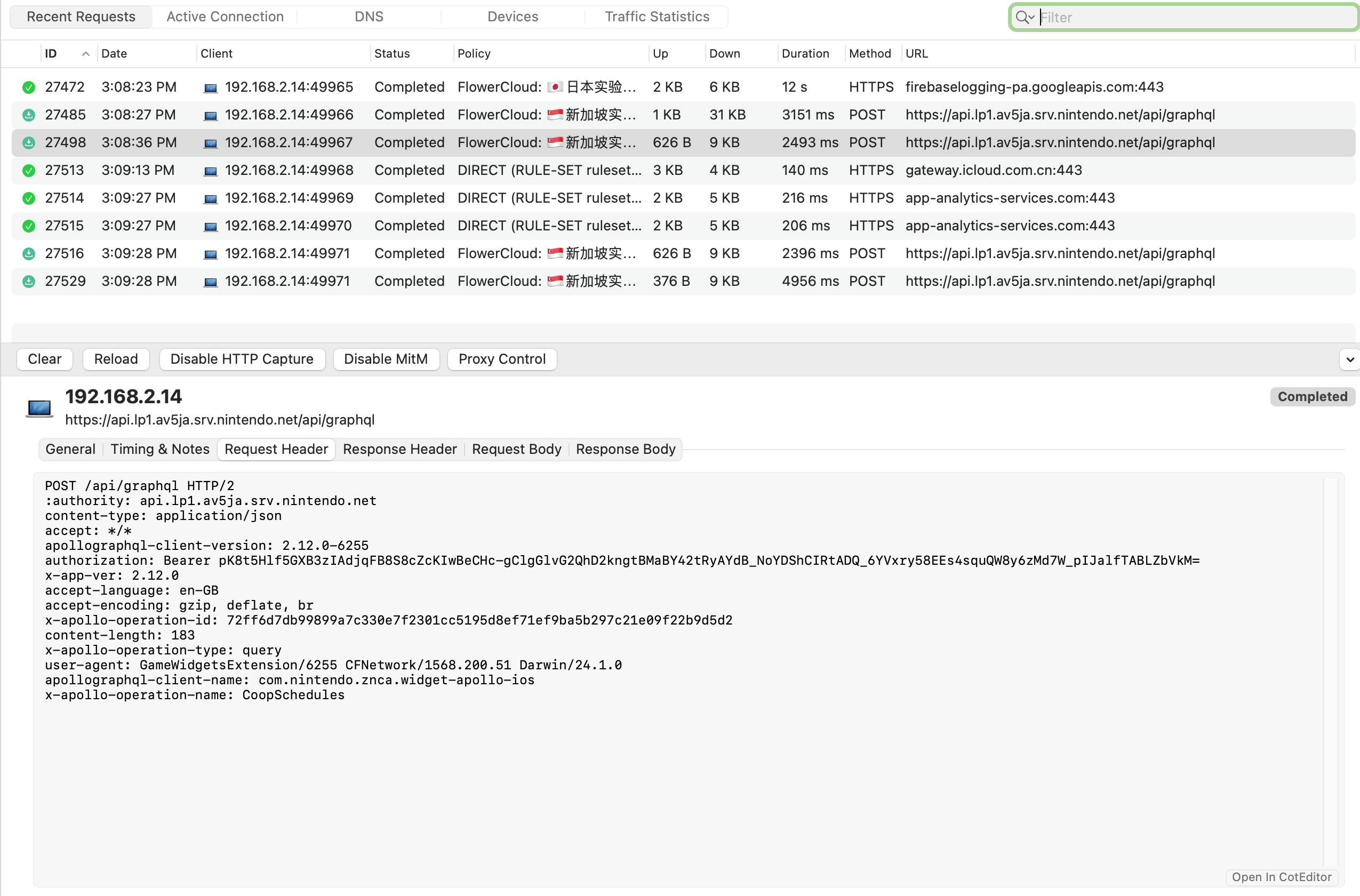
  5. 在 Surge DashBoard 中,找到对应的请求,查看请求的 URL 和请求头,以及响应的内容。
alt text

这样就获取到了查看游戏日程这个请求所调用的 API。相关计算机网络原理在最后一小节会提到。

编写脚本

分析抓包的结果,可以看到使用的是 GraphQL 查询语言,查询相关资料发现,与传统的 RESTful API 不同,GraphQL 允许客户端精确地指定它需要的数据,我正好只需要游戏日程中的“打工”部分,查询指定的字段即可。 这里我选择使用 Node.js 来实现这个 GraphQL 查询功能,采用 express 来创建 API 服务,axios 来发送 GraphQL 请求,项目的结构如下。

1
2
3
4
5
6
7
/splatoon-graphql-api
├── node_modules/            # 存放依赖包
├── src/
│   ├── index.js             # 入口文件,启动express服务
│   └── graphqlClient.js     # 封装GraphQL请求逻辑
├── package.json             # 项目配置文件
└── .env                     # 环境变量配置(GraphQL API URL)
  1. 安装依赖 在我的项目文件夹中初始化一个新的 Node.js 项目,并安装所需的依赖。
    1
    2
    
    npm init -y
    npm install express axios dotnev
    
    其中 dotnev 是用来读取环境变量的,我这里将 GraphQL API 的 URL 放在了环境变量中,方便后续的修改。
  2. 编写 graphqlClient.js
     1
     2
     3
     4
     5
     6
     7
     8
     9
    10
    11
    12
    13
    14
    15
    16
    17
    18
    19
    20
    21
    22
    23
    24
    25
    26
    27
    28
    29
    30
    31
    32
    33
    34
    35
    36
    37
    38
    39
    40
    41
    42
    43
    44
    45
    46
    47
    48
    49
    50
    51
    52
    53
    54
    55
    56
    57
    58
    59
    60
    61
    62
    
     const axios = require('axios');
     require('dotenv').config();
    
     // 从环境变量中获取graphql api 的 url 
     const GRAPHQL_API_URL = process.env.GRAPHQL_API_URL;
    
     const fetchGameSchedule = async () => {
         // 构建 GraphQL 查询, 这里指查询了我需要的那几项日程信息
         const query = `
         query {
             coopGroupingSchedule {
                 regularSchedules {
                     nodes {
                         startTime
                         endTime
                         setting {
                             boss {
                                 name
                             }
                             coopStage {
                                 name
                             }
                             weapons {
                                 name
                             }
                         }
                     }
                 }
             }
         }
         `;
         try {
             // 发送POST请求
             const response = await axios.post(GRAPHQL_API_URL, {
                 query: query
             }, {
                 headers: {
                     'authorization': 'Bearer nSQ7mylOLrfq9xqJ9IwNqr4voYyynLfKmOYCSlPC5OSPjCi99RHNyTOzMtKT55s-zcPdbC1_w_DWKBTjMdHWxwLmEtJBgDzXct6lDDrbrRBP9trRErMECdO6zfo='
                 }
             });
    
             // 提取并格式化数据
             const schedules = response.data.data.coopGroupingSchedule.regularSchedules.nodes.map(schedule => {
                 // 提取每个赛程需要的信息
                 return {
                     startTime: schedule.startTime,
                     endTime: schedule.endTime,
                     bossName: schedule.setting.boss.name,
                     coopStageName: schedule.setting.coopStage.name,
                     weapons: schedule.setting.weapons.map(weapon => weapon.name)
                 };
             });
    
             // 返回响应数据
             return schedules;
         } catch (error) {
             console.error('Error fetching game schedule: ', error);
             throw error;
         }
     };
    
     module.exports = { fetchGameSchedule };
    
    其中,像 weapons 这样的字段,由于是数组,所以需要用 map 方法来提取每个元素的信息。
  3. 编写 index.js index.js 是应用的入口,在此设置 Express 服务器并将路由与 API 端点关联。
     1
     2
     3
     4
     5
     6
     7
     8
     9
    10
    11
    12
    13
    14
    15
    16
    17
    18
    19
    20
    21
    22
    23
    24
    25
    26
    27
    28
    29
    30
    
     // src/index.js
     const express = require('express'); // 引入 express
     const dotenv = require('dotenv');
     const { fetchGameSchedule } = require('./graphqlClient');
    
     // 加载环境变量
     dotenv.config();
    
     const app = express();
     const port = process.env.PORT || 3000;
    
     // 创建路由来获取游戏日程
     app.get('/gameschedule', async (req, res) => {
         try {
             // 获取查询结果
             const schedules = await fetchGameSchedule();
             // 返回数据给客户端
             res.json(schedules);
         } catch (error) {
             console.error('Error fetching game schedule:', error);
             res.status(500).json({ error: 'Failed to fetch game schedule' });
         }
     });
    
     const axios = require('axios');
    
     // 启动服务器
     pp.listen(port, () => {
     console.log(`Server is running on http://localhost:${port}`);
     });
    
  4. 编写 .env 用来存储抓包得到的 GraphQL API 的 URL。
    1
    
    GRAPHQL_API_URL = https://api.lp1.av5ja.srv.nintendo.net/api/graphql
    
  5. 启动项目 在 package.json 中添加 "start": "node src/index.js",然后运行 npm start 启动项目。

报错

启动项目后,在浏览器中访问 http://localhost:3000/gameschedule,发现报错 Cannot GET /,重新检查代码,确定发送的是 POST 请求。

发现如果查询语法错误或者查询格式不符合服务器要求,服务器可能不会正确处理查询而返回 GET 错误信息。使用 console.log 来打印和检查实际发送的请求,在 index.js 中添加如下代码。

 1
 2
 3
 4
 5
 6
 7
 8
 9
10
11
12
13
14
15
16
17
18
19
20
21
22
23
24
25
26
27
28
29
30
31
32
const axios = require('axios');

axios.post('https://api.lp1.av5ja.srv.nintendo.net/api/graphql', {
  query: 
    query {
      coopGroupingSchedule {
            regularSchedules {
                  nodes {
                    startTime
                    endTime
                    setting {
                         boss {
                            name
                         }
                         coopStage {
                             name
                          }
                         weapons {
                             name
                         }
                       }
                    }
                }
            }
    }
})
.then(response => {
  console.log(response.data);
})
.catch(error => {
  console.error('Error:', error);
});

运行后 Axios 报告请求失败并返回 400 Bad Request 错误。这意味着请求的格式不符合服务器的要求或者查询内容有问题。

下面先检查请求的格式。再次查看抓包获取的数据,发现请求头中不仅有鉴权,还有其他许多信息。在这里我把每一条 header 都试了一遍,发现只有 authorizationx-web-view-ver 是必需的,加上 x-web-view-ver 后,请求的格式符合服务器的要求。

再来检查查询内容。抓包获取的 Request body 中有 variablesextensions, 但是再加上我自己的 query 后,服务器依旧返回 400 Bad Request 错误。猜测是任天堂服务端使用的是预先定义好的 query,而不是用户自定义的 query。因此,只需要从它返回的所有 query 中选择我需要的数据即可。

修改 index.js 代码如下。

 1
 2
 3
 4
 5
 6
 7
 8
 9
10
11
12
13
14
15
16
17
18
19
20
21
22
23
24
25
26
27
28
29
30
31
32
33
34
35
36
37
38
39
40
41
42
43
44
45
46
47
48
49
50
51
52
53
54
55
56
57
58
59
60
61
62
// src/index.js
const express = require('express'); // 引入 express
const dotenv = require('dotenv');
const { fetchGameSchedule } = require('./graphqlClient');

// 加载环境变量
dotenv.config();

const app = express();
const port = process.env.PORT || 3000;

// 创建路由来获取游戏日程
app.get('/gameschedule', async (req, res) => {
    try {
        // 获取查询结果
        const schedules = await fetchGameSchedule();
        // 返回数据给客户端
        res.json(schedules);
    } catch (error) {
        console.error('Error fetching game schedule:', error);
        res.status(500).json({ error: 'Failed to fetch game schedule' });
    }
});

const axios = require('axios');

axios.post('https://api.lp1.av5ja.srv.nintendo.net/api/graphql', {
    "variables": {
    },
    "extensions": {
        "persistedQuery": {
            "version": 1,
            "sha256Hash": "4d18c17431b591452e7baab6e29d98dcf1bdc5eebe3a7b693d768e80c0d5ccef"
        }
    }
}, {
    headers: {
        'authorization': 'Bearer jRuoZAF2Bc39VTNuVqQ_U1rhGCbpeNqNJFO_XoH5ithBW3SNCaxnJFXMnBtcrwffjPDmgYBTtvXwkIw8khCaQ5ET9Fg06BOiqUlfLsWs9MciUPVNbgEOPeveRrQ=',
        'x-web-view-ver': '6.0.0-9253fd84'
    }
})
    .then(response => {
        const schedules = response.data.data.coopGroupingSchedule.regularSchedules.nodes.map(schedule => {
            // 提取每个赛程需要的信息
            return {
                startTime: schedule.startTime,
                endTime: schedule.endTime,
                bossName: schedule.setting.boss.name,
                coopStageName: schedule.setting.coopStage.name,
                weapons: schedule.setting.weapons.map(weapon => weapon.name)
            };
        });
        console.log(schedules);
    })
    .catch(error => {
        console.error('Error:', error);
    });

// // 启动服务器
// app.listen(port, () => {
//     console.log(`Server is running on http://localhost:${port}`);
// });

得到运行结果如下。

 1
 2
 3
 4
 5
 6
 7
 8
 9
10
11
12
13
14
15
16
17
18
19
20
21
22
23
24
25
26
27
28
29
30
31
32
33
34
35
36
37
38
39
40
41
42
43
44
45
46
47
48
49
50
51
52
53
54
55
56
57
[
  {
    startTime: '2025-02-17T16:00:00Z',
    endTime: '2025-02-19T08:00:00Z',
    bossName: 'Cohozuna',
    coopStageName: 'Bonerattle Arena',
    weapons: [
      'Sploosh-o-matic',
      'Dread Wringer',
      'Clash Blaster',
      'Wellstring V'
    ]
  },
  {
    startTime: '2025-02-19T08:00:00Z',
    endTime: '2025-02-21T00:00:00Z',
    bossName: 'Horrorboros',
    coopStageName: "Marooner's Bay",
    weapons: [
      'Splattershot',
      'Dynamo Roller',
      'Ballpoint Splatling',
      '.96 Gal'
    ]
  },
  {
    startTime: '2025-02-21T00:00:00Z',
    endTime: '2025-02-22T16:00:00Z',
    bossName: 'Megalodontia',
    coopStageName: 'Spawning Grounds',
    weapons: [
      'Squeezer',
      'Flingza Roller',
      'Recycled Brella 24 Mk I',
      'Goo Tuber'
    ]
  },
  {
    startTime: '2025-02-22T16:00:00Z',
    endTime: '2025-02-24T08:00:00Z',
    bossName: 'Cohozuna',
    coopStageName: "Jammin' Salmon Junction",
    weapons: [
      'Undercover Brella',
      'Aerospray MG',
      'Dualie Squelchers',
      'Splat Charger'
    ]
  },
  {
    startTime: '2025-02-24T08:00:00Z',
    endTime: '2025-02-26T00:00:00Z',
    bossName: 'Horrorboros',
    coopStageName: 'Sockeye Station',
    weapons: [ 'Bloblobber', '.52 Gal', 'Splatana Wiper', 'Snipewriter 5H' ]
  }
]

可以看到成功返回了我需要的游戏日程。

MITM

前面提到我使用了 macOS 上的 Surge 来进行抓包,最近正好在刷面经看到了 TCP 这一块的内容,于是搜索了相关文档,了解了 Surge 执行 MITM 的原理和过程。

首先,MITM 是一种网络攻击技术,它允许攻击者拦截和修改两个设备之间的通信。最常见的 MITM 攻击方式有 ARP 欺骗DNS 欺骗SSL/TLS 欺骗伪造证书颁发机构 等。Surge 采用的是动态证书生成模式,即时伪造服务端证书。根据其 官方文档,流程如下。

  1. 用户配置 MITM 功能,Surge 在本地生成密钥对,并生成根证书安装到系统证书存储中。
  2. 收到对 example.com:433 的 CONNECT 请求,进入 MITM 模式,并直接通知客户端与服务器的 TCP 握手已完成。
  3. 客户端通过 ClientHello 消息开始 TLS 握手。
  4. Surge 立刻为 example.com 生成服务端证书并对配置的根证书进行签名,从而完成与客户端的握手。
  5. 客户端在 HTTP 层进行通信,发送真正的 HTTP 请求。
  6. Surge 收到请求后进行修改,并确定出站策略。使用相应的策略通过向真实的 example.com 发起连接并完成 TLS 握手来转发请求。

Surge 在收到客户端的 TLS 握手请求(ClientHello)时,不依赖真实服务器的证书,而是直接基于配置的根证书动态生成目标域名(如 example.com)的服务端证书。这要求握手过程必须独立于真实服务器连接,因此必须预先生成证书。

客户端与 Surge 之间的 TLS 连接建立后,Surge 同时持有客户端和真实服务器的 TLS 会话密钥,在两者之间进行双向转发数据(将客户端的解密后的 HTTP 请求转发给真实服务器和将服务器的解密后的 HTTP 响应返回给客户端),从而可以解密双方流量。

Licensed under CC BY-NC-SA 4.0
Built with Hugo
Theme Stack designed by Jimmy